
You found the hiring manager. You have the role in front of you. A message window is open. And then you close the tab. Not because you do not know what to say, but because sending a message to a stranger feels wrong somehow, too forward, too needy, too much.
This hesitation is more common than most job seekers admit. And it is quietly costing people interviews. Knowing how to message a recruiter on LinkedIn is not just a tactical skill. It is the difference between waiting for someone to notice your application and making sure they do.
This guide walks you through exactly what to write, when to send it, and how to stop overthinking the process. If you want to understand the full picture of reaching decision-makers beyond a single message, the broader approach to AI-powered outreach to recruiters and hiring managers shows how a well-timed LinkedIn message fits into a complete job search strategy.
Why messaging a stranger on LinkedIn feels so uncomfortable
The discomfort is not irrational. Most people grow up learning that asking strangers for things is inappropriate. Reaching out to someone you have never met, at their place of work, about a job you want, activates every social warning built into that lesson.
The fear usually comes down to one of three things: looking desperate, bothering someone busy, or being told no in a way that feels personal. None of these fears are signs that you should not reach out. They are signs that you care about the outcome, which is actually what makes a good candidate.
Research from LinkedIn Talent Solutions consistently shows that recruiters expect and welcome direct outreach from candidates. They do not experience a thoughtful message as an intrusion. They experience it as initiative. The candidates who never reach out are the ones recruiters never think about.
The goal is not to eliminate the discomfort entirely. The goal is to write a message good enough that the discomfort becomes irrelevant once you hit send.
What to message a recruiter on LinkedIn
The biggest mistake job seekers make is trying to say too much. A LinkedIn message to a recruiter is not a cover letter. It is a door knock. Its only job is to get a response.
A strong message has four elements.
- A specific reason you are reaching out. Not “I am looking for opportunities” but “I applied for the Senior Marketing Manager role yesterday and wanted to connect directly.”
- One sentence about your background. Not a full resume summary. One sentence that is relevant to the role.
- A reason it is relevant to them. Something specific about the company or team that shows you actually looked.
- A low-pressure close. Not “Can we schedule a call?” but “Happy to share more if it would be helpful.”
According to Indeed, messages under 100 words get significantly higher response rates than longer ones. Recruiters are scanning, not reading. Every word that does not earn its place is a reason for them to move on.
How to message a recruiter on LinkedIn after applying
Messaging a recruiter after you have already applied is different from cold outreach, and it is often easier. You have a concrete reason to reach out. You are not asking them to consider you out of nowhere. You are following up on something you already did.
The window to send this message is 24-48 hours after submitting your application. Any later and the moment has passed. Any sooner and it can feel impulsive.
The message should be brief. Confirm you applied, mention one specific reason the role is a strong match for your background, and say you would welcome the chance to connect. That is it. You are not following up to chase a status update. You are following up to be a person instead of an application.
For situations where your application gets no response at all, a more structured approach to following up on a job application can help you decide when to push forward and when to move on.
How to find the right person to message
One of the most time-consuming parts of recruiter outreach is figuring out who to contact. Job postings often list a generic HR email or no contact at all. Tracking down the actual hiring manager or recruiter responsible for a role can take 20–30 minutes of searching per application, which adds up quickly across an active job search.
HirePilot solves this directly. When you apply for a role through the platform, it identifies the hiring manager behind the position and generates a personalized outreach message you can send immediately. You are not starting from a blank page or spending time on LinkedIn searching for the right contact. The message is ready. You review it, adjust anything that feels off, and send.
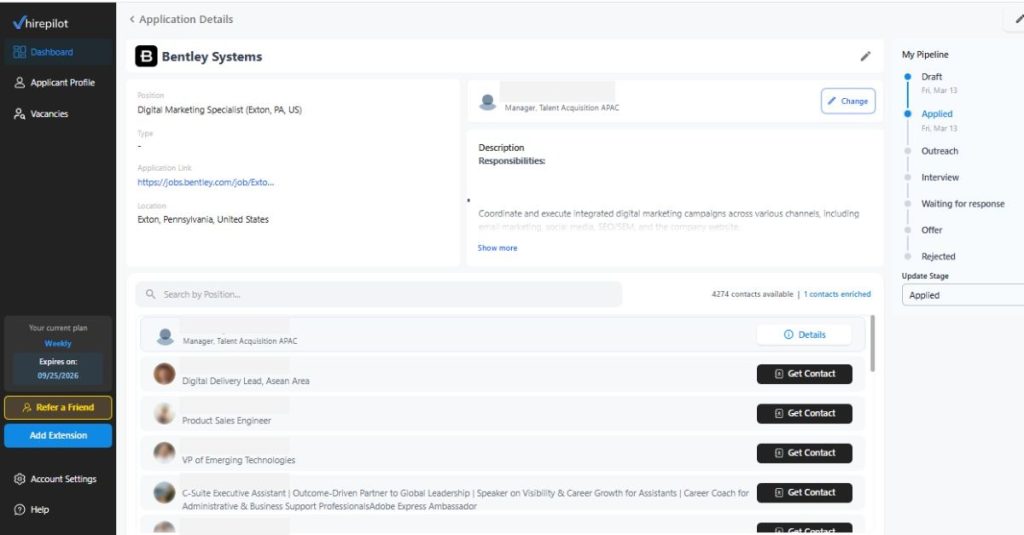
The feature exists because autofilling an application is only half the job. Getting your application in front of a real person is the other half. Both matter, and most tools only handle one of them.
Sample message to a recruiter on LinkedIn: four templates that work
Use these as starting points. The more you personalize each one, the better your response rate will be. A message that references something real about the company or the recruiter’s background will always outperform a generic template, even a well-written one.
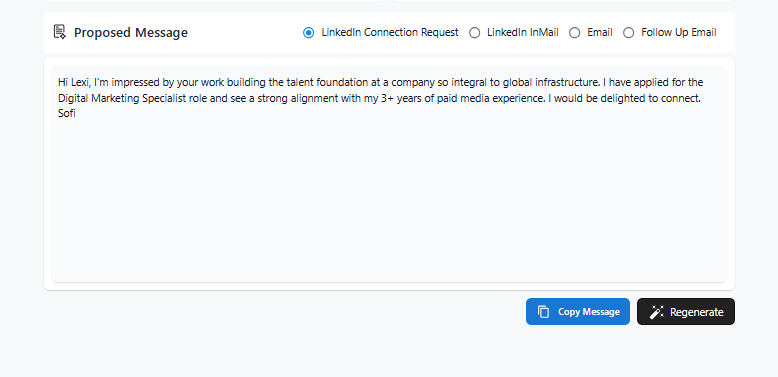
Template 1:LinkedIn Connection Request
The connection request is your first move and the hardest to get right. It needs to fit inside LinkedIn’s character limit, feel personal rather than templated, and give the recruiter a reason to accept without asking for anything yet. HirePilot pulls context from the recruiter’s profile and the company to write something specific to that person, not a generic opener you could send to anyone. The result reads like a message a confident candidate wrote, not something generated in seconds.
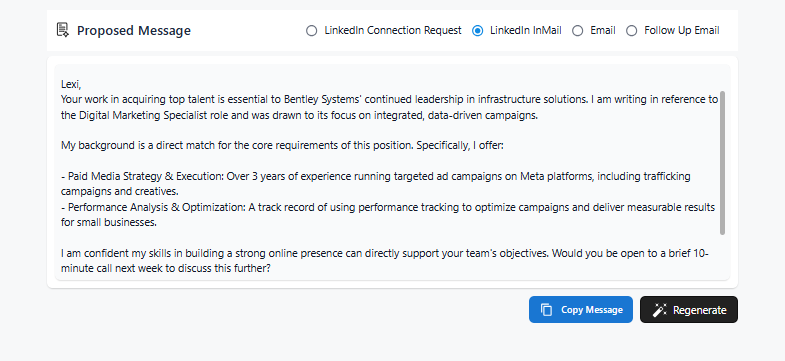
Template 2: LinkedIn InMail
InMail gives you more room to make your case. HirePilot uses that space to open with something specific about the recruiter’s role at the company, then connect your actual skills to the requirements of the position before closing with a direct but low-pressure ask. The structure mirrors what experienced candidates write after spending 30 minutes researching a contact. Here it takes about three seconds.
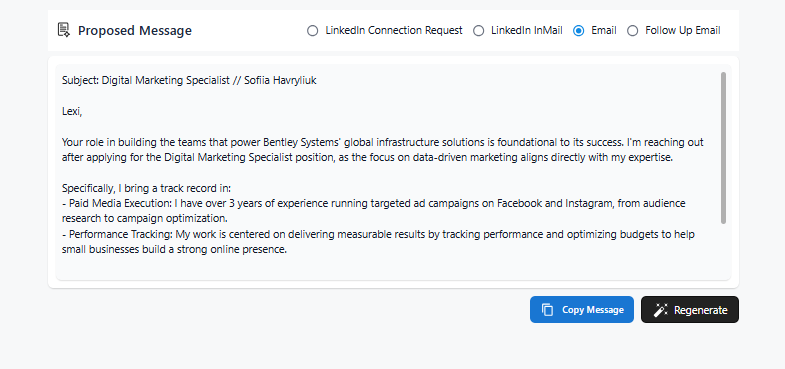
Template 3: Email
The email version is built for an inbox, not a LinkedIn notification. The subject line includes your name and the role so the recruiter can find it later without searching. The body stays focused on two specific skills that match the job, and the closing question is short enough that it takes less than five seconds to answer. No preamble, no lengthy summary of your resume, just the information the recruiter needs to decide whether to reply.
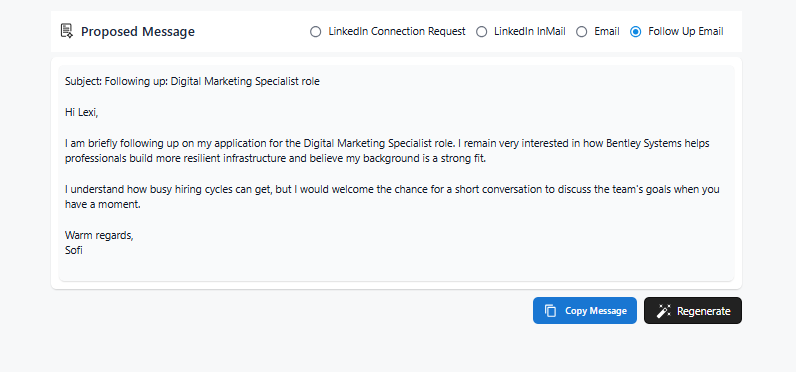
Template 4: Follow Up Email
Most job seekers either follow up too aggressively or not at all. This message finds the middle ground. It acknowledges that hiring cycles are busy without apologizing for reaching out, restates interest without repeating everything from the first message, and ends with an open invitation rather than a demand for a call. It is the kind of follow-up that keeps you on someone’s radar without making them want to ignore you.
Personalizing outreach at scale is where most job seekers struggle. The tactics that make cold messages feel personal instead of generic come down to a few specific habits that are easier to build than most people expect.
What happens after you send the message
Most people send a message and then check their inbox every 20 minutes for two days. This is normal and also not useful.
Recruiters manage large candidate pipelines. A message from you is one of many inputs they are processing on any given day. Response time varies widely depending on where the role is in the hiring cycle, how many candidates they are managing, and whether your message landed at the right moment.
If you have not heard back in five to seven business days, a single follow-up is appropriate. Keep it shorter than your original message. One or two sentences acknowledging you reached out previously and reaffirming your interest is enough. SHRM research on recruiter communication indicates that candidates who follow up once are viewed positively. Candidates who follow up repeatedly are not.
No response does not always mean rejection. It often means timing. Roles get paused. Recruiters go on leave. Inboxes overflow. The most productive thing you can do while waiting is continue applying and reaching out elsewhere, so no single conversation carries the weight of your entire search.
Understanding why recruiters do not respond to messages can help you separate a fixable problem from a situation that simply needs more time.
Stop letting the message sit unsent
Every application you send without a follow-up message is a missed opportunity to be a person instead of a file. Recruiters respond to candidates who take initiative. The message does not have to be perfect. It has to exist.
HirePilot finds the hiring manager behind any role and writes the outreach message for you. Create a free account and send your first recruiter message today without spending an hour figuring out who to contact or what to say.
FAQ: How to Message a Recruiter on LinkedIn with Confidence
Should I message a recruiter on LinkedIn after applying?
Yes. Sending a brief message after you apply puts your name in front of the recruiter as a person, not just a resume in the system. The message should be short, reference the specific role, and include one relevant detail about your background. Send it within 24-48 hours of applying.
Should you message a recruiter on LinkedIn directly, or wait for them to reach out?
Do not wait. Recruiters manage hundreds of applications at once and are not systematically reviewing every profile. Reaching out directly is how you move from passive applicant to active candidate. Most recruiters view proactive outreach positively, provided the message is relevant and respectful.
What is the best message to send to a recruiter on LinkedIn?
The best message is short, specific, and personal. It references the exact role, includes one sentence about why your background is relevant, and closes with a low-pressure ask. Messages under 100 words consistently outperform longer ones. Avoid generic phrases like “I am a hard worker” or “I am very interested in this opportunity.”
How long should a LinkedIn message to a recruiter be?
Keep it under 100 words. Three to four sentences is the target. Recruiters read these messages quickly, often on mobile, between other tasks. A message that takes more than 30 seconds to read is too long.
What if the recruiter does not respond?
Wait five to seven business days, then send one brief follow-up. If there is still no response after that, move on. No response is not a rejection. It is usually a timing issue. Continue applying to other roles and do not let one unanswered message slow your search.
Is it okay to message a hiring manager directly on LinkedIn?
Yes, and it is often more effective than messaging the recruiter. Hiring managers have a direct stake in filling the role. A relevant, well-written message that demonstrates genuine interest in the team’s work gets noticed. Keep it respectful and specific.
How many recruiters should I message per day?
Quality over volume. Three to five personalized messages per day will produce better results than 20 generic ones. Each message should reference something specific about the role or company. Mass outreach with identical messages gets ignored and can damage your professional reputation on the platform.